How to Improve Collaboration by Addressing Packet Loss


What’s the point of reporting bugs? Devs just ignore them anyway . . .
That was the gist of a conversation I had with one of my project managers when I led a support division. He and his team managed the process for making sure customer reported bugs were addressed consistently. He came to this particular meeting with another potential plan—and a whole lot of frustration.
The frustration stemmed from needing the development and support teams to follow a clear, documented process for resolving customer bugs, but every iteration of the official documentation was ignored, rendering the process pointless. Instead, support agents relied on unsustainable workarounds—like private Slack pings or offering customers creative solutions—which created friction and confusion between the teams.
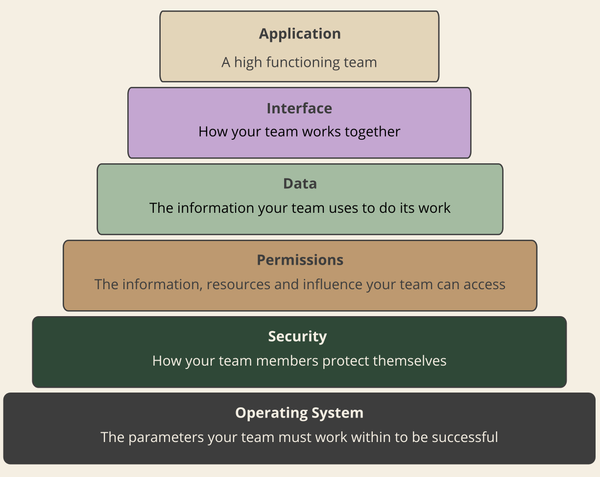
I knew the problem wasn’t a lack of care, so I took a step back. Why were two teams who both prioritized customer success pointing fingers at each other? I realized the conflict wasn’t personal, but a fundamental failure in how information was being passed between them. I now call that kind of issue a bug in the interface layer of the Leadership Stack.
Packet Loss in Human Systems
A key indicator of an interface bug is when team members make requests without getting a response: Bug reports are filed but not resolved. Code reviews are requested but ignored. Project updates are shared but not acknowledged.
It’s easy to assume the requests are being actively ignored, but in my experience it’s more like packet loss—the requests were never received.
Packet loss happens in a human system for the same basic reasons it happens in a network connection, and it can be debugged in similar ways.
Congestion and Overload issues
When a person's cognitive load is maxed out, the brain begins to filter and discard new input, saving only what fits neatly into established mental categories. That means when your developers get emails about new priorities, Slack pings asking them to “look at this tiny issue real quick”, meeting invites to discuss new deadlines or a shift in priorities, plus the never-ending list of new features to write and issues to resolve, eventually they start dropping packets.
You may not be able to stop the flood of information, but you can control the data structure to prioritize signal over noise. The goal isn't to store everything, but to ensure critical data packets are immediately intelligible and retrievable
- Prioritize critical information. Treat every message as a data payload. Lead with the essential elements first—the Action (what needs to be done), next the Objective (why it matters), and then the Context (history/background). This ensures that even if the cognitive connection drops packets, the most critical data is likely to make it through.
- Default to public communication. Instead of sending requests in email or private messages, do as much of your team’s work in a public channel as possible. That way if one person drops a packet, it’s not lost forever. A teammate can pick it up, or they can come back and refer to the original message once they realize they need more information.
- Remove bottlenecks. When a single person (often you) has to approve too many processes, it’s only a matter of time before they get overwhelmed. Then no matter how quickly the rest of the team is working, the process falls apart on that step.
System Configuration Issues
System configuration issues mean the communication pathways themselves are flawed, even when traffic is low. This happens when systems are designed based on assumptions about how people should work rather than how they actually work. The system is flawed if it forces unnecessary friction into the daily workflow via three primary communication errors:
- Difficult paths: High friction in the workflow—where communicating or documenting takes more effort than the task itself—causes system bypass. Implement AI tools to instantly lower this overhead by auto-generating draft code comments, documentation, or meeting summaries.
- Annoying paths: Repetitive, irritating, or disruptive interface work drains cognitive energy, causing packets to be mentally discarded. Automate these processes where possible. When full automation isn't feasible, use templates to handle the repetitive setup and skip directly to the parts that require human judgment
- Out of the way paths: Any communication path that requires leaving the primary workflow (context switching) almost guarantees packet loss. Embed (or at least link) communication requirements directly into the tools and processes developers are already using.
Latency Issues
Sometimes packets aren’t dropped, they are just slow. But when the delay isn’t expected, people resend messages, which can overload the system (see above). Crucially, from the sender’s perspective, silence can mean either “I’m working on it” or “I didn’t get your message at all.” That ambiguity creates unnecessary stress and uncharitable assumptions about what is and isn’t getting done.
If you can address the latency (with automation or by implementing other interface issues patches) that’s great. If not, you can still minimize the impact of latency issues by setting clear, shared expectations about how long the delay will be.
The goal is to eliminate the ambiguity of silence.
Your helpdesk probably already has a system like this in place. When a new ticket comes in, the system sends an automated message letting the sender know their request has been received and about how long it will take to respond.
For a team, you can sometimes forgo the automated message as long as you have a shared expectation for how much latency is expected.
Debugging your own interface layer
When collaboration breaks down, the answer usually isn’t more reminders, more pressure, or better attitudes. It’s fixing the way the work connects.
If you find yourself frustrated with work falling through the cracks or other forms of miscommunication, it's time to debug your team’s interface layer.
Here are some questions that can help you and your team figure out where the problem is.
- Which parts of our work do we forget about most often? How could we connect those responsibilities to the work we never forget?
- What only gets done because of regular reminders? How could we automate or build those reminders into our workflows?
- When is it hard to tell if a colleague is still working on a problem or if they forgot about it? What expectations could we agree to so everyone knows when to wait, and when to send the request again?
- What kinds of communication did we stop doing because it wasn’t worth the effort? How might we use AI tools to bring it back?
If you find a bug but aren’t sure how to fix it, let me know and we can work on it together. I offer one-off debugging sessions that are especially well suited for resolving interface bugs and restoring team efficiency.